Starting with Linux Part-1: An Introduction and Hands-On Basic Commands - Day 2/90

My academic journey is primarily driven by my passion for DevOps knowledge.
Linux, a remarkable open-source operating system, has captured the hearts of tech enthusiasts worldwide since its inception by Linus Torvalds in the early 1990s. It serves as the backbone for a myriad of devices, ranging from smartphones and servers to embedded systems and supercomputers.
What exactly Linux is? 🤔
Linux stands as an operating system kernel, the very heart of an OS that orchestrates hardware resources and delivers essential services to user-level applications. It takes inspiration from Unix, a renowned OS celebrated for its stability and robustness. However, what sets Linux apart is its open-source nature, meaning that its source code is freely accessible for anyone to examine, modify, and distribute.
Linux Architecture 🏗️
The architecture of Linux is often described as "monolithic kernel." Here are the pivotal components that compose the Linux operating system:
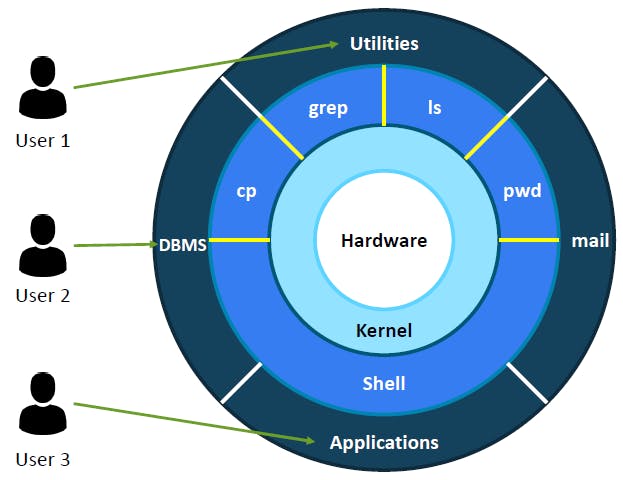
Kernel
Shell
Libraries
System Utilities
Graphical User Interface (GUI)
Application Software
Popular Linux Distributions 🌟
Ubuntu
Kali Linux
Debian
Fedora
CentOS
Arch Linux
Linux Mint
Commands of linux
ls - list the contents present in the directory (i.e folder for Windows user)

pwd - prints the working directory

cd - change directory

mkdir - creates a new directory

touch - to create a new file (eg txt, html or any other file)

cp - copy files or folder from source to destination

mv - move files or folder from source to destination

rm - removes file or folder

whoami - show the current user

cat - shows the content of the files

Bonus
If you want to execute the above commands without installing a Linux OS, then I've got you covered! I'm dropping a link below where you can run commands through your browser. 🌐🖥️
Just click on the link, and you'll be able to execute those commands without any hassle. Also, there are ample of linux distros available form which you can select the one which suits you best. Happy coding! 🚀💻
Conclusion 🎉
Linux, with its open-source spirit, robust community, and adaptability, stands as a compelling operating system choice for both beginners and seasoned users. Whether you seek a stable server platform or a user-friendly desktop environment, Linux has a niche for every taste. 🐧💻 Embrace the penguin and explore the world of Linux!
If you find this blog helpful, please give it a like and share it with others! Your support means a lot and will encourage me to create more content like this. 🙌✨ Let's spread the knowledge!


